How can we help?
Practical guides and answers for your training.
Guides
Step by stepTaking part in live operations
An operation at the Brandenburg Gate: follow Anna, Ben and Mia with Sammy from the call to the find.
Open guide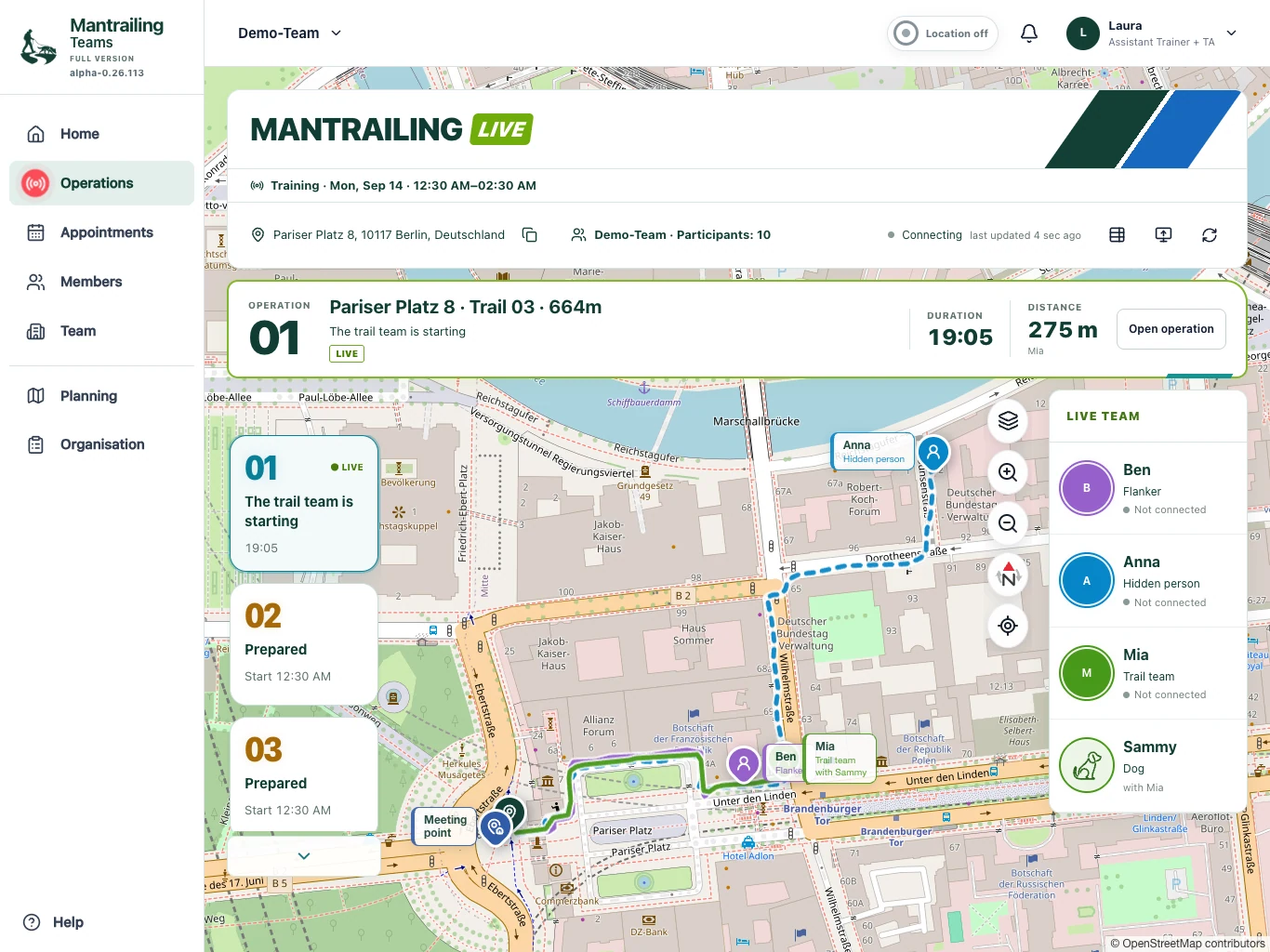
Mantrailing glossary
From scent articles to trail layers: mantrailing vocabulary, abbreviations and the terms used in Mantrailing Teams, explained simply.
Create and update appointments
Arrange a session, manage participation and communicate changes clearly.
Manage your team
Members, roles, groups and shared team functions explained.
Subscriptions and costs
What applies to the whole team, what remains free and how to manage a subscription.
Examination rules and examiner mode
Choose a rulebook, submit missing rules and use event-specific examiner access.
Location and privacy
When positions are collected, how you control this and who can see which information.
Frequently asked questions
Does every member need a subscription?
No. The subscription applies to the team and its administration manages booking. Members do not pay separately for the app. Any club or training fees charged by your team are separate.
Read more: Subscriptions and costsCan I join several teams?
Yes. You need approved access in each team. Use the team selector to switch. Separate accounts of your own can be linked using the private connection code and Connect with more teams. Roles, data and subscriptions remain separate per team.
Read more: Manage your teamWhat remains available in the base version?
Appointments, calendar and participation, free trail planning, members, groups and the team overview are included. Your role still determines what you may change. Live recording, operation organisation and full-version evaluations are not part of the base version.
Read more: Subscriptions and costsWhen is my location collected?
The open phone app makes sparse checks around relevant appointments. Precise collection can run during an active nearby operation. Deliberate map and location functions can request a position too. A started recording saves waypoints; showing a position and recording a trail are not the same.
Read more: Location and privacyHow do members, trainers, co-trainers and team admins differ?
Members participate and use their permitted views. Trainers and co-trainers organise training, plan trails and assign operations. Team admins also manage team access, settings and subscriptions. Hidden person, flanker and trail team are assignments for an individual operation.
Read more: Manage your teamHow do I accept or decline an appointment?
Open Appointments, choose the session and respond. Select your dog if needed. Check whether you have a confirmed place or are on the waiting list. Update your response promptly if you cannot attend.
Read more: Create and update appointmentsWhere do I see who is running and when it is my turn?
Operations shows numbered blocks and their current statuses. The operation table lists assigned names and roles. When your assignment is called, the call button opens your personal view. A prepared block is not yet permission to start.
Read more: Taking part in live operationsCan I present operations on a monitor?
Yes. Use the monitor icon in Operations, for example at events or examinations. Check the visible names, positions and trails first. A monitor does not extend permissions and should not reveal confidential or examination-related hiding places.
Read more: Taking part in live operationsWhy can the trail team not see the hidden-person trail?
Depending on visibility, this is intentional so the route does not give away the search. Your own path can still be recorded. Double Blind also hides the reference from the flanker.
Read more: Taking part in live operationsWhich team functions are available?
The team overview combines activity, members, dogs, progress and results, with location suggestions and groups. Depending on plan and role, training diaries, equipment reservations and confirmed transfers of locations and trails between teams are also available.
Read more: Manage your teamHow does examiner mode work?
Organisers invite an examiner from Organisation for an event or examination. The link opens reduced examiner access and can be connected to an existing account. Examiners see only authorised appointments, operations and read-only organisation. They cannot start anything and do not share their own location. The optional find confirmation updates the shared find status.
Read more: Examination rules and examiner modeCan the base version be used free indefinitely?
The current base plan costs 0 € and has no usage time limit. You do not need a paid subscription to continue using it. The full-version trial, however, is time-limited.
Read more: Subscriptions and costsWhat does sparse location mean?
Around relevant appointments, the open phone app requests a low-power position about every five minutes. The window runs from one hour before the appointment to two hours after it ends. Within two kilometres and without an active assignment, sparse mode is intended. This is not continuous trail recording; opening the app can trigger extra checks.
Read more: Location and privacyHow do I switch location off?
Press and hold the location indicator and confirm switching it off. You can also change location permission in your phone settings. The next assignment may remind you that location is off. Switching off does not delete existing data.
Read more: Location and privacyDoes recording continue with the screen locked?
In the installed phone app, active precise recording can continue in the background with the necessary permissions. Device settings, power-saving and reception can affect this. Normal browser views are less reliable for background recording. Check recording and synchronisation status.
Read more: Location and privacyWhat if these FAQs do not answer my question?
Use the contact option below. Describe your question and name the team. For an app issue you can also send a report under Help & Support. Never include passwords, private connection codes or payment details.
Still looking for an answer?
Use the contact option. We are happy to help.